How to Set Up Ondrela: iPhone and Android Guide
Most people finish in about a minute. No app to download and no account to create. Pick your phone below and follow the steps.
Before You Start
- Your phone
- iPhone with the Find My app, or Android with the Find Hub app
- Settings
- Bluetooth and Location turned on
- The card
- If it doesn't respond, give it a short charge on a Qi wireless pad first
- Time needed
- About one minute
- One rule
- Each card connects to one phone network. Use the phone you carry every day.
Set Up Ondrela on iPhone (Apple Find My)
Find My is already on every iPhone. Here's how to add Ondrela to it.
Open Find My
Open the Find My app that comes with your iPhone.
Add an Item
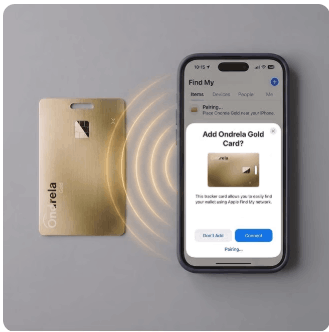
Go to the Items tab, tap Add Item, then choose Other Supported Item.
Hold It Close
Hold Ondrela next to your iPhone. When it appears, tap Connect.
Name It
Call it Wallet, Passport or Suitcase, and pick an emoji so it's easy to spot.
Turn On Alerts
Tap your new item and turn on Notify When Left Behind. You're done.
Set Up Ondrela on Android (Google Find Hub)
Find Hub is Google's finder app. On some older phones it may still be called Find My Device.
Turn On Bluetooth
Make sure Bluetooth and Location are both switched on.
Open Find Hub
Open the Find Hub app on your Android phone.
Add & Hold Close
Tap Add and hold Ondrela next to your phone. If a pairing pop-up appears, tap Connect.
Name It
Follow the on-screen steps and give the card a name like Wallet.
Ring & Track
You can now ring Ondrela and see it on the Find Hub map.
How to Use Ondrela Every Day
🔔 Ring It
Tap your Ondrela item in Find My or Find Hub and choose Play Sound. Follow the chime to the couch cushion, coat pocket or glovebox.
🗺️ See It on the Map
Open the app to see where your card is, or the last place a nearby phone saw it. In busy places, the map updates often.
⚠️ Left-Behind Alerts (iPhone)
With Notify When Left Behind turned on in Find My, your iPhone alerts you when you walk away from your wallet or bag. Add trusted places like home so you only get alerts when it matters.
📍 Mark It as Lost
Both Find My and Find Hub let you put an item in lost mode, so you can leave a message for anyone who finds it.
How to Charge Ondrela
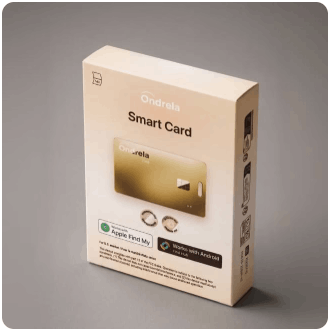
- Use any Qi wireless pad, the same kind many phones use.
- Lay the card flat in the middle of the pad.
- One full charge lasts up to 6 months.
- Set a reminder every five months so it never runs low.
- Charge before a trip so your passport and luggage cards are ready.
Ondrela Not Working? Try These Quick Fixes
| Problem | Try this |
|---|---|
| Phone can't find the card | Turn on Bluetooth and Location, hold the card right next to the phone, and give it a short charge. |
| It won't ring | Make sure you're within Bluetooth range, usually a room or two away indoors. |
| Map isn't updating | Far-away location updates when a compatible phone passes nearby. It updates fastest in busy places. |
| No left-behind alerts | On iPhone, check that Notify When Left Behind is on for that item in Find My. |
| Card is on the wrong phone | Remove it from the first app, then add it again on the phone you carry every day. |
Still stuck? Contact Ondrela customer support → Every order is also covered by the 60-day money-back guarantee.
Ondrela Price in Canada (CAD)
Set up one card for each thing you can't afford to lose. The 4-pack is CA$35 per card.
4 Cards
Wallet, passport, luggage and keys. Best value.
Get 4 Cards3 Cards
The traveller's set: wallet, passport and luggage.
Get 3 Cards2 Cards
Wallet and passport, or one each for you and your partner.
Get 2 CardsOndrela Setup FAQ
How do I connect Ondrela to my iPhone?
Open the Find My app, go to Items, tap Add Item and choose Other Supported Item. Hold Ondrela next to your iPhone, tap Connect when it appears, then give it a name.
How do I connect Ondrela to my Android phone?
Turn on Bluetooth and Location, open the Find Hub app, tap Add and hold Ondrela close to your phone. If a pairing pop-up appears, tap Connect and follow the steps.
Do I need to download an Ondrela app?
No. Ondrela works inside the finder app already on your phone: Find My on iPhone or Find Hub on Android. There is no extra app and no new account.
Can I use Ondrela with both iPhone and Android?
Each card connects to one network at a time, so set it up on the phone you carry every day. In a mixed home, give each person their own card on their own phone.
How do I turn on left-behind alerts?
On iPhone, open Find My, tap your Ondrela item and turn on Notify When Left Behind. You can add places where you don't need alerts, like home.
How do I charge Ondrela?
Lay the card flat on any standard Qi wireless charging pad. One full charge lasts up to 6 months. A reminder every five months keeps it topped up.
How long does Ondrela setup take?
About a minute for most people. Charge the card first if it doesn't respond, then follow the steps for your phone.
What if Ondrela won't pair?
Make sure Bluetooth and Location are on, hold the card right next to your phone, give it a short charge and restart your phone. If it still won't pair, contact Ondrela customer support.
One Minute to Set Up. Peace of Mind for Months.
Get Ondrela from CA$35 per card, with 60-day returns and delivery across Canada.
Check Today's Price in Canada →🔒 Secure official checkout · Prices in CAD · 60-day money-back guarantee